Showing posts with label Digital Scrapbooking. Show all posts

Thursday, October 11, 2012

DIY Hybrid Halloween Banner and Photoshop "clipping" tutorial


One of my favorite days of the week is Wednesday, because over at Jessica Sprague they have $1 and 50% sales on digital papers and elements. I am not affiliated with the site in any way, except as a shopper who loves getting a great deal on Echo Park, Pink Paislee and other trendy paper company designs.

I have a friend who really, really likes Halloween. She does a wonderful job decorating her home and gets everyone in the spooky spirit. I'm not so big on Halloween, but thought it would be fun to make her a little mantle banner for her fireplace using some of this week's $1 deals from the Echo Park "Chillingsworth Manor" collection.

As I've begun dabbling in digital one of my favorite tricks has been discovering the use of "clipping".  Nearly any digital element can be used to "cut" out the shape of your choice.

I created the pennants for my friend's banner using the following steps:

1. Open the pattern paper and resize it so that the print will be proportionate to your project. I wanted to make the pennants in my banner 4x6.

Select the Image drop down menu: Resize: Image Size.

Be sure that "contrain proportions" is not checked and enter the width and height you would like to use. I always set my resolution at 300.


2. Open the shaped element of your choice:
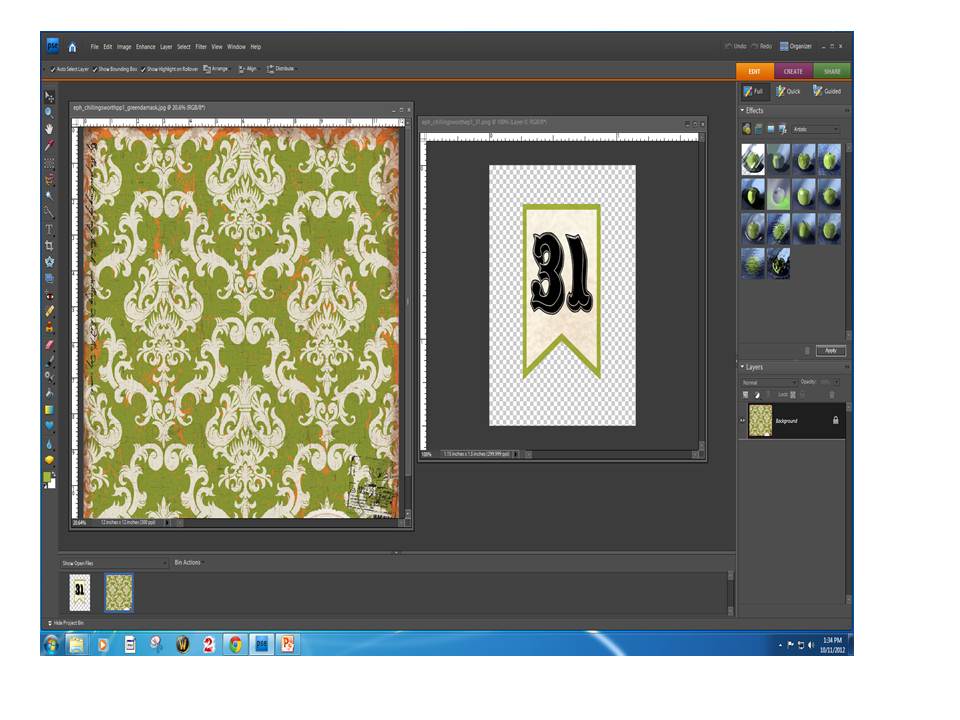

 HINT: In order to see the images side by side select the Windows drop menu, Images and Tile option.

3. Now using your mouse drag your paper on top of the shape you will be cutting.

Be sure that in your Layers Palette that your pattern paper is above the shape you will be cutting.

4. Press and hold the Alt key while positioning the pointer over the line dividing the two layers in the Layers palette (the pointer will change to two overlapping circles ) and click.


The technical term that Photoshop uses for this is "grouping with previous".  It can also be accomplished by going to the "layer" drop down menu and selecting "group with previous".

If this process doesn't work out, it is most likely because your layers are not in the correct order in your palette.

Now you can embellish your pennants as you wish.  I added a number of elements from the Echo Park Chillingsworth Manor collection.


I'll share the completed project with you in my next post,


Have a lovely day,

CarrieAnne


Thursday, September 20, 2012

Hanging with Grandpa - Echo Park Digital Project Life Layout

Echo Park Digital Project Life Layout
Serendipitous Scrapper

Fall has descended in full force here in Northern Georgia. Drizzling rain, cool mornings and the first appearance of long sleeve shirts and jackets.

I've a fascination with photographing my kids from behind. Whether they are walking away holding hands, peering up at the sky or looking at animals with their Grandpa as in the attached layout I love seeing their different heights and interactions from an alternative perspective. You also never have to worry about them blinking!

Here is the second part of my 2 page Project Life spread using Echo Park digital products by Lori Whitlock.

One of the things I like about Project Life is the ability to capture stories and pictures about a variety of things in one layout. These photos were all taken at the Abe Lincoln National Boyhood historic site, but I was able to record a story regarding Reid's shoes, things my mom always does on vacation and my feelings about my big brother all in one layout.  In the past I would have done at least 4 layouts to cover these things and more likely than not they would not have gotten scrapped due to limited time. I like that I'm journaling and scrapping at the same time.


InLinkz.com


There are a bunch of new flowers in the works that I'm uploading to the shop and I'll show images and projects on the blog soon.

Have a great day,

CarrieAnne

Monday, August 27, 2012

Sweet Baby Journaling Card and Digital Freebie

I've been experiencing some frustrating computer challenges over the last week. The kind that make you want to tear your hair out and scream "Why Me?" in cave-mannish angst.

I do have one more fabric stamping project to share with you - hopefully tomorrow if my offering to the computer gods has sated their fury.

Until than I thought I would share this journaling card. The image of the baby on the scale is from a 1904 McCalls Magazine. I've supplied it just in case you wanted to use it by itself.

Journaling Card Freebie - Sweet Baby
Vintage McCalls Baby on Scale Ad Image

As always you may use these images for S4H, CU, or PU so long as you link back to the blog.

Have a great day,

CarrieAnne